<br />
<b>Notice</b>:  Only variables should be passed by reference in <b>/home/vhosts/zhangjintao.noads.biz/wp-includes/pomo/mo.php</b> on line <b>210</b><br />
<br />
<b>Notice</b>:  Only variables should be passed by reference in <b>/home/vhosts/zhangjintao.noads.biz/wp-includes/pomo/mo.php</b> on line <b>210</b><br />
<?xml version="1.0" encoding="UTF-8"?>
<rss version="2.0"
	xmlns:content="http://purl.org/rss/1.0/modules/content/"
	xmlns:wfw="http://wellformedweb.org/CommentAPI/"
	xmlns:dc="http://purl.org/dc/elements/1.1/"
	xmlns:atom="http://www.w3.org/2005/Atom"
	xmlns:sy="http://purl.org/rss/1.0/modules/syndication/"
	xmlns:slash="http://purl.org/rss/1.0/modules/slash/"
	>

<channel>
	<title>思考未来 &#187; 技术文档</title>
	<atom:link href="https://zhangjintao.noads.biz/?cat=14&#038;feed=rss2" rel="self" type="application/rss+xml" />
	<link>https://zhangjintao.noads.biz</link>
	<description>Zhangjintao的Wordpress</description>
	<lastBuildDate>Fri, 29 Mar 2013 13:39:30 +0000</lastBuildDate>
	<language>zh-CN</language>
	<sy:updatePeriod>hourly</sy:updatePeriod>
	<sy:updateFrequency>1</sy:updateFrequency>
	<generator>http://wordpress.org/?v=3.5.1</generator>
		<item>
		<title>GitHub Pages 搭建静态空间</title>
		<link>https://zhangjintao.noads.biz/?p=15</link>
		<comments>https://zhangjintao.noads.biz/?p=15#comments</comments>
		<pubDate>Sat, 23 Feb 2013 12:58:34 +0000</pubDate>
		<dc:creator>zhangjintao</dc:creator>
				<category><![CDATA[技术文档]]></category>
		<category><![CDATA[收藏]]></category>

		<guid isPermaLink="false">http://zhangjintao.noads.biz/?p=15</guid>
		<description><![CDATA[关于Github GitHub 是一个用于使用Git版本控制系统的项目的基于互联网的存取服务,GitHub于2 [...]]]></description>
				<content:encoded><![CDATA[<h1>关于Github</h1>
<p>GitHub 是一个用于使用Git版本控制系统的项目的基于互联网的存取服务,GitHub于2008年2月运行。在2010年6月，GitHub宣布它现在已经提供可1百万项目，可以说非常强大。</p>
<p>Github虽然是一个代码仓库，但是Github还免费为大家提供一个免费开源Github Pages空间，利用这个空间你可以搭建轻量级的博客系统，绑定自己的域名，存放一些图片和文件等等。</p>
<p>严格的说Github Pages不是空间，而是为代码提供可视化页面，例如HTML</p>
<h1>开始之前</h1>
<ul>
<li><span style="line-height: 14px;">Github Pages 开发难度太高，以前需要敲入很多Git命令，不过现在有Github Windows 客户端解决这个问题（尽管现在也要敲入一定量的Git）<br />
</span></li>
<li>Github Pages空间是一个开源免费的空间，所以建议大家不要滥用，关于音乐、视频类的文件最好不要放在这个空间上。</li>
</ul>
<p><span style="line-height: 24px;"> </span></p>
<h1>注册一个账号</h1>
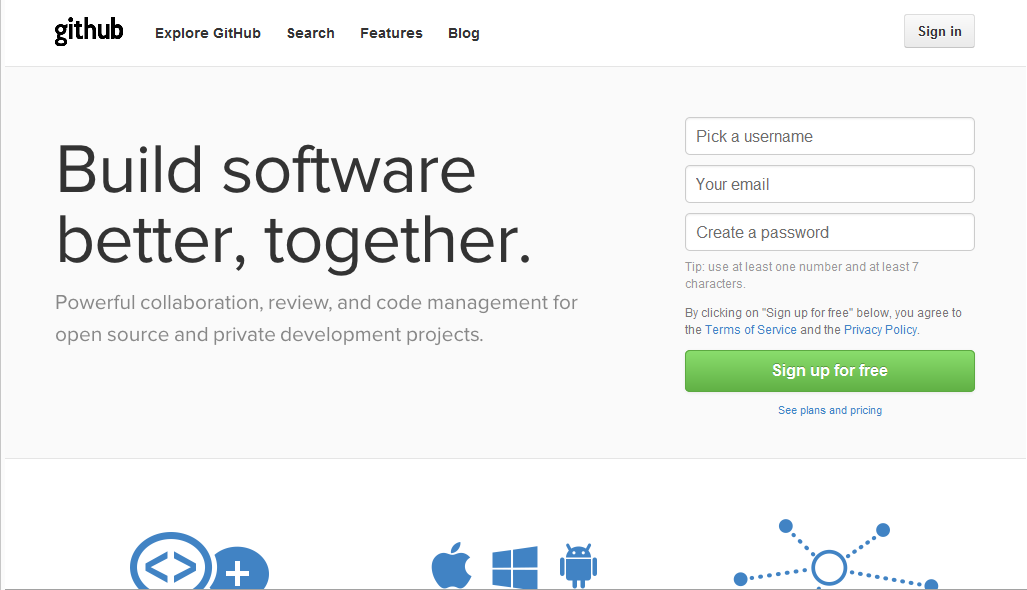
<p>打开<a href="https://github.com/" target="_blank">https://github.com/</a>注册一个账号。</p>
<p><a href="http://zhangjintao.noads.biz/wp-content/uploads/2013/02/Capture.png"><img class="alignnone size-full wp-image-17" alt="Capture" src="http://zhangjintao.noads.biz/wp-content/uploads/2013/02/Capture.png" width="1027" height="590" /></a></p>
<p>&nbsp;</p>
<p>“Pick a username” 输入一个用户名</p>
<p>“Your Email” 你的电子邮件</p>
<p>“Create a Password” 创建一个密码</p>
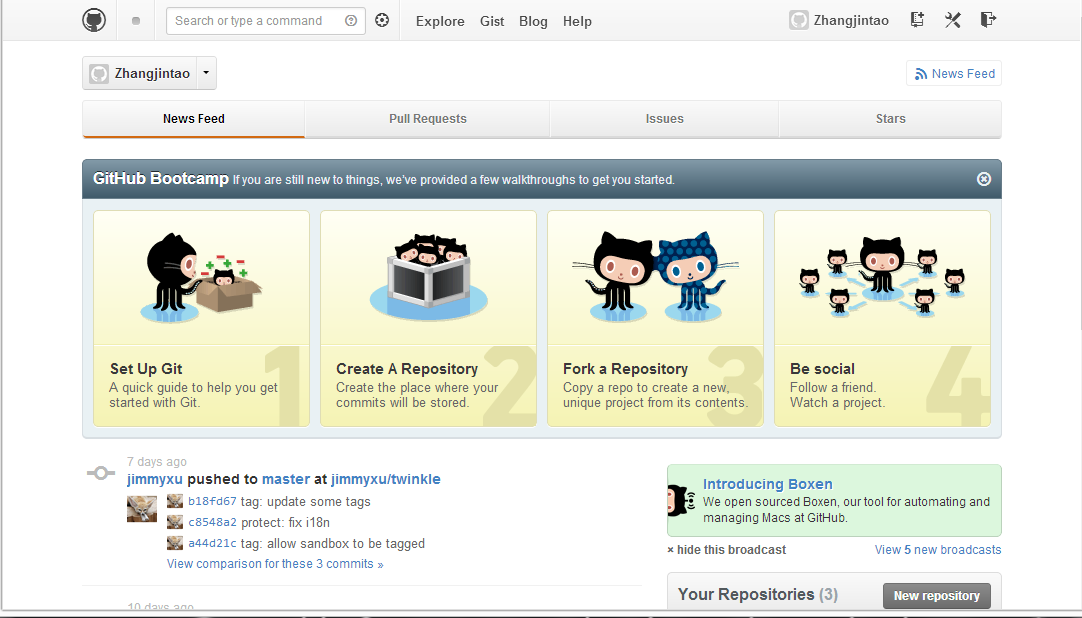
<p>注册完后点击上面的Sign in 登陆</p>
<p>登陆完应该是这个样子滴。。</p>
<p><a href="http://zhangjintao.noads.biz/wp-content/uploads/2013/02/Capture1.png"><img class="alignnone size-full wp-image-18" alt="Capture" src="http://zhangjintao.noads.biz/wp-content/uploads/2013/02/Capture1.png" width="1082" height="618" /></a></p>
<h1>创建一个项目</h1>
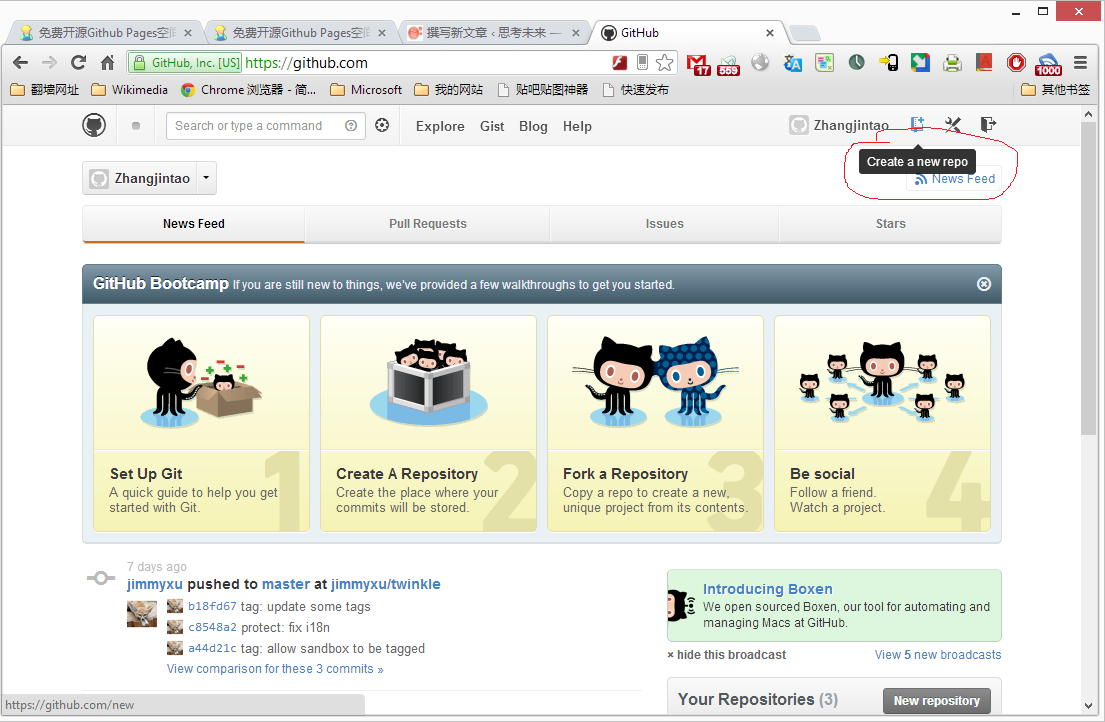
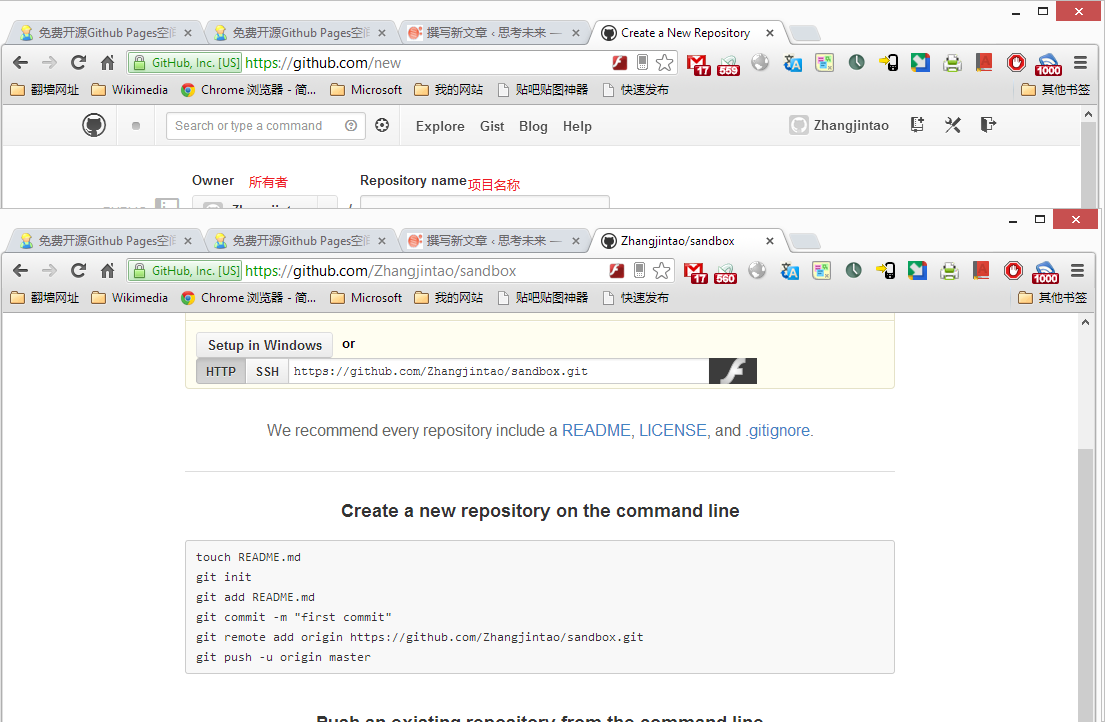
<p>点击你的用户名右侧的“Create a new respo”</p>
<p><a href="http://zhangjintao.noads.biz/wp-content/uploads/2013/02/Untitled.png"><img class="alignnone size-full wp-image-19" alt="Untitled" src="http://zhangjintao.noads.biz/wp-content/uploads/2013/02/Untitled.png" width="1105" height="722" /></a></p>
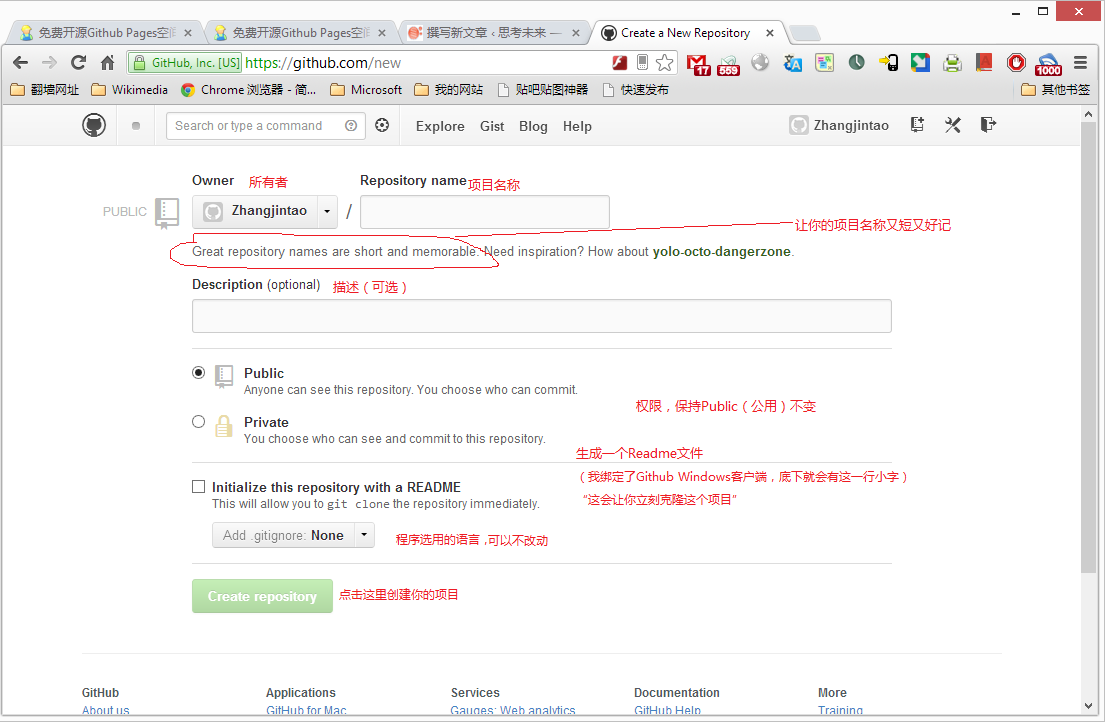
<p>注册项目界面，我简单的翻译了下</p>
<p><a href="http://zhangjintao.noads.biz/wp-content/uploads/2013/02/Untitled1.png"><img class="alignnone size-full wp-image-20" alt="Untitled" src="http://zhangjintao.noads.biz/wp-content/uploads/2013/02/Untitled1.png" width="1105" height="722" /></a></p>
<p>&nbsp;</p>
<p>接下来会有一串代码，记得截图，一会要用</p>
<p><a href="http://zhangjintao.noads.biz/wp-content/uploads/2013/02/Untitled2.png"><img class="alignnone size-full wp-image-21" alt="Untitled" src="http://zhangjintao.noads.biz/wp-content/uploads/2013/02/Untitled2.png" width="1105" height="722" /></a></p>
<p>&nbsp;</p>
<h1>安装Windows 版Github</h1>
<p>访问windows.github.com 点击“Download“下载，然后安装</p>
<h1>在客户端上设置你的Git</h1>
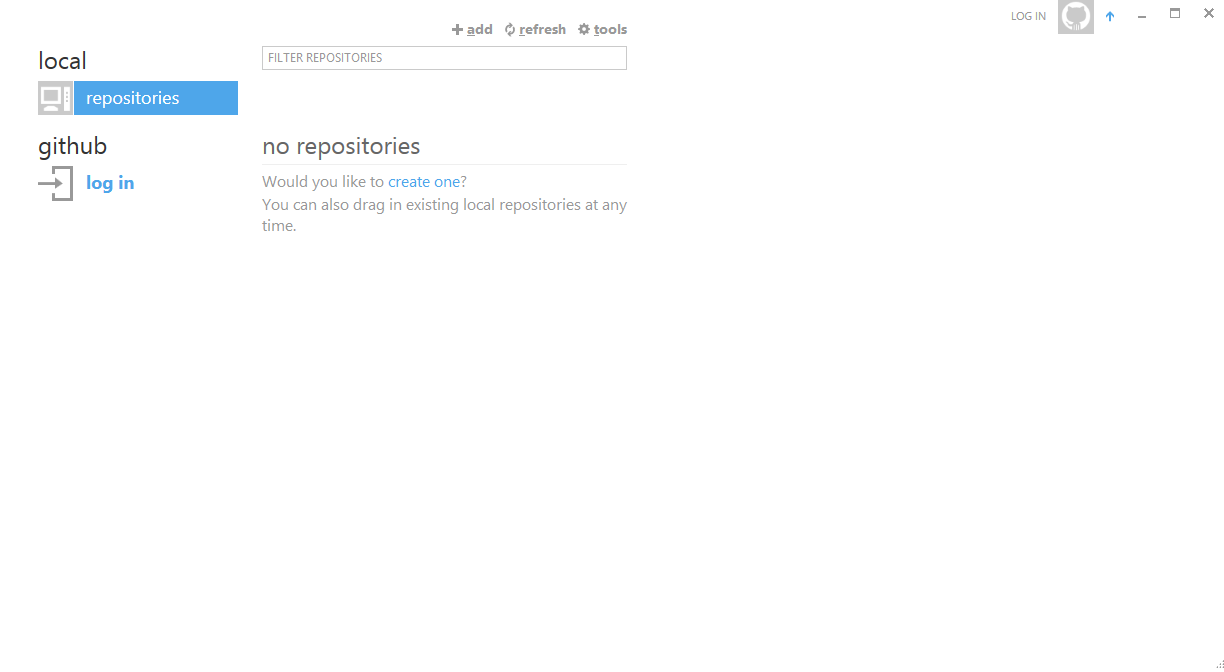
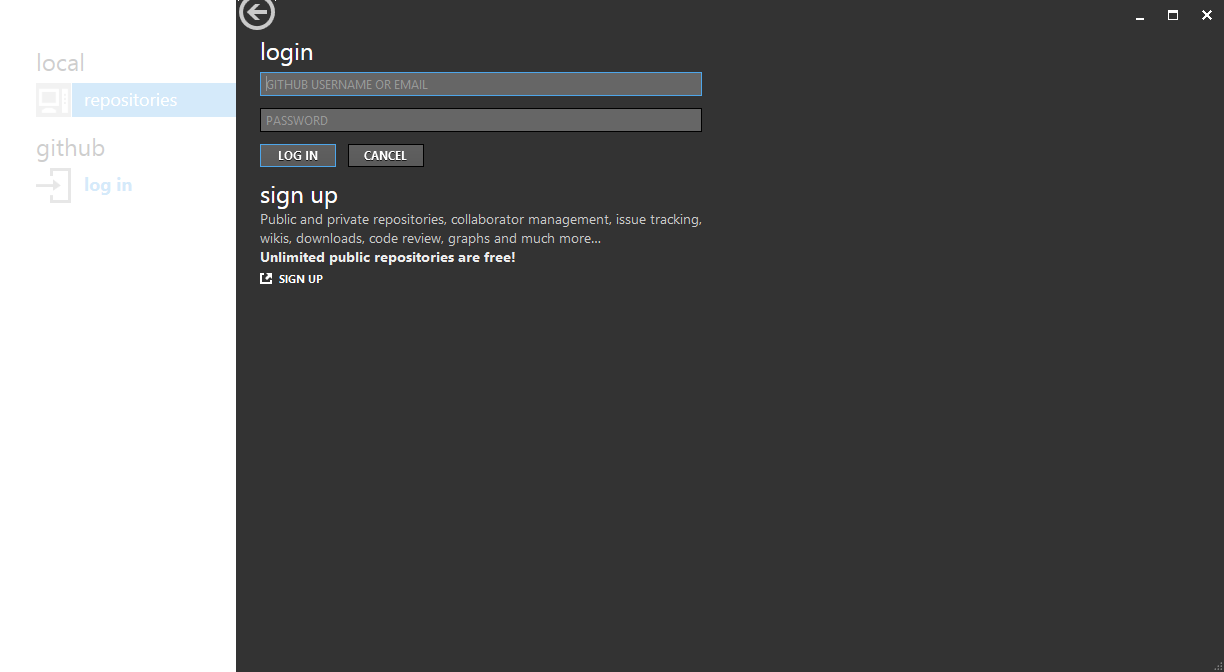
<p>运行Github点击”Log in“</p>
<p><a href="http://zhangjintao.noads.biz/wp-content/uploads/2013/02/Untitled4.png"><img class="alignnone size-full wp-image-25" alt="Untitled" src="http://zhangjintao.noads.biz/wp-content/uploads/2013/02/Untitled4.png" width="1224" height="672" /></a></p>
<p>&nbsp;</p>
<p>第一行，你的用户名</p>
<p>第二行，你的密码，完成后点击Log in</p>
<p>&nbsp;</p>
<p><a href="http://zhangjintao.noads.biz/wp-content/uploads/2013/02/Untitled5.png"><img class="alignnone size-full wp-image-26" alt="Untitled" src="http://zhangjintao.noads.biz/wp-content/uploads/2013/02/Untitled5.png" width="1224" height="672" /></a></p>
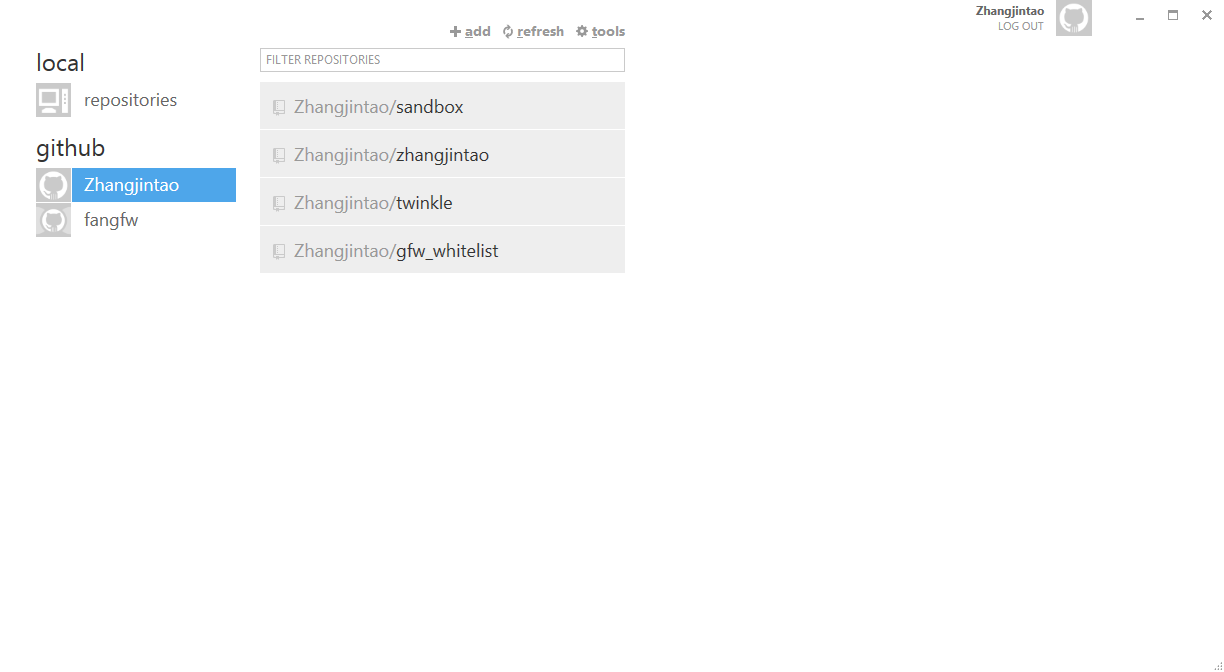
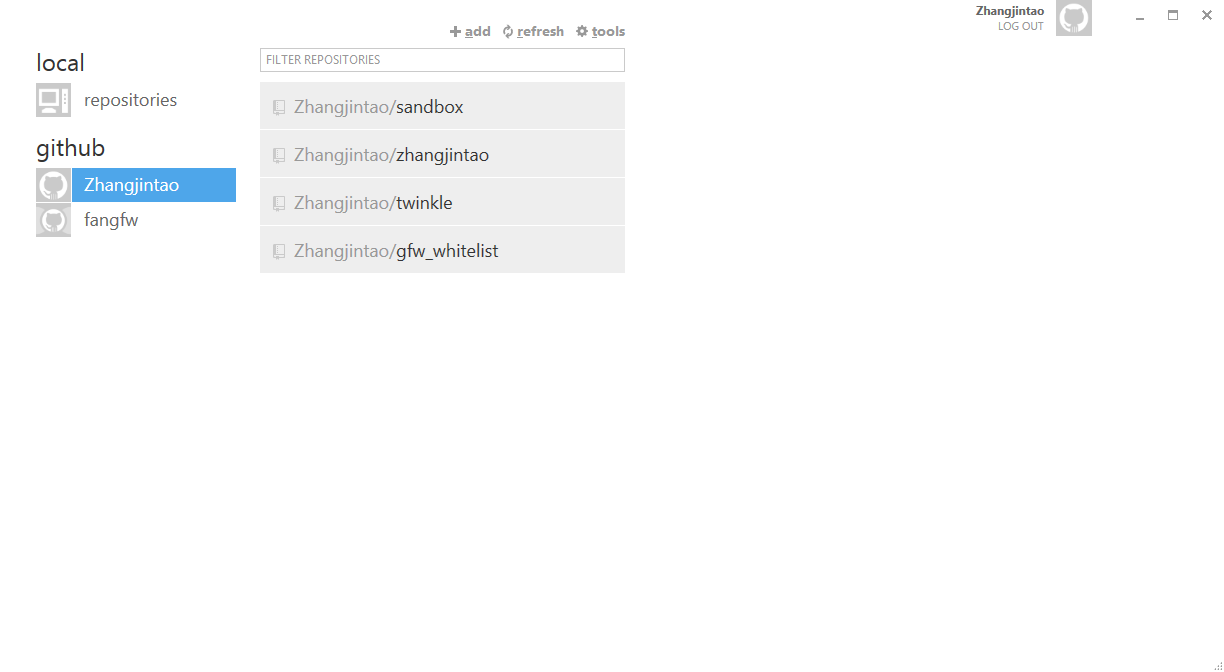
<p>点击”Refresh“刷新，然后找到你的项目名称</p>
<p><a href="http://zhangjintao.noads.biz/wp-content/uploads/2013/02/Untitled6.png"><img class="alignnone size-full wp-image-27" alt="Untitled" src="http://zhangjintao.noads.biz/wp-content/uploads/2013/02/Untitled6.png" width="1224" height="672" /></a></p>
<p>&nbsp;</p>
<p>&nbsp;</p>
<p>单击你的项目，在单击Clone，复制一份到你的电脑上</p>
<p><a href="http://zhangjintao.noads.biz/wp-content/uploads/2013/02/Untitled7.png"><img class="alignnone size-full wp-image-28" alt="Untitled" src="http://zhangjintao.noads.biz/wp-content/uploads/2013/02/Untitled7.png" width="1224" height="672" /></a></p>
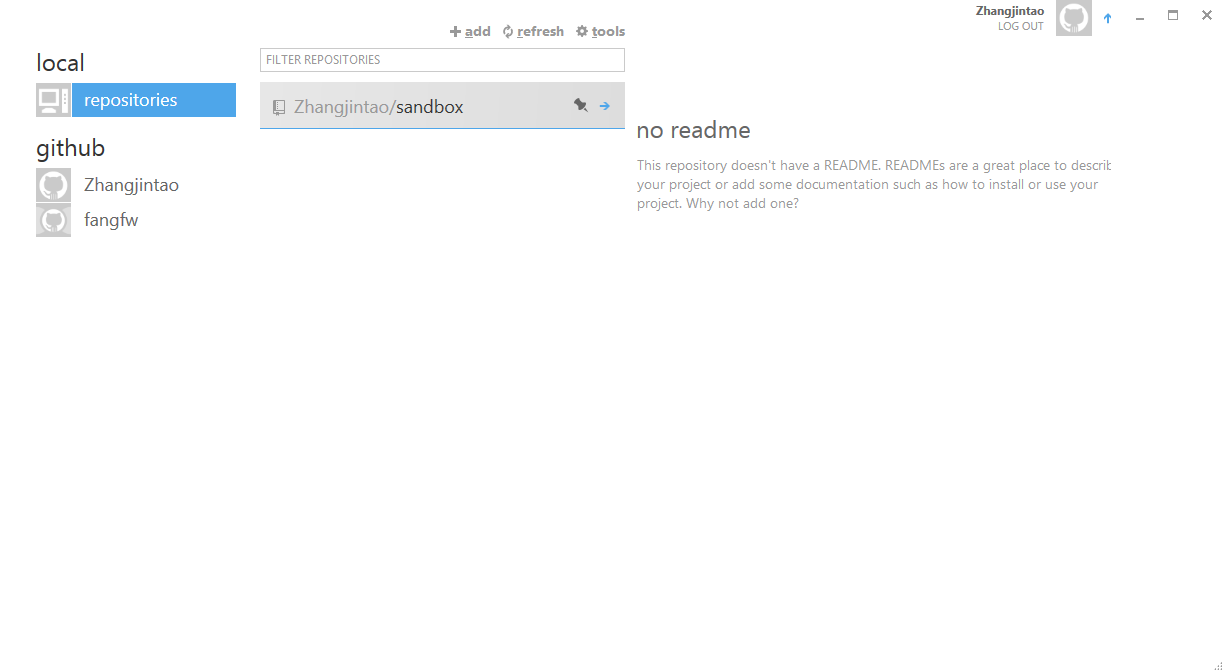
<p>复制完成后点击”Local“找到你的项目</p>
<p><a href="http://zhangjintao.noads.biz/wp-content/uploads/2013/02/Untitled8.png"><img class="alignnone size-full wp-image-29" alt="Untitled" src="http://zhangjintao.noads.biz/wp-content/uploads/2013/02/Untitled8.png" width="1224" height="672" /></a></p>
<p>&nbsp;</p>
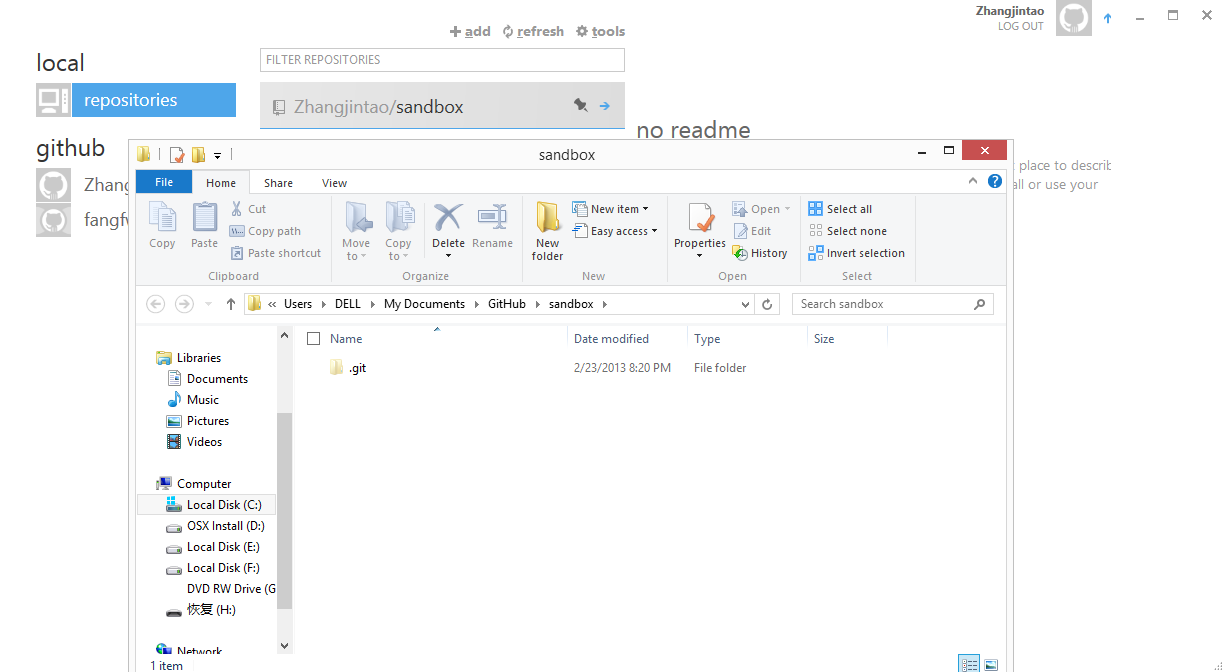
<p>右键点击，然后单击Open explorer ，在文件资源管理器中打开你的Git</p>
<p><a href="http://zhangjintao.noads.biz/wp-content/uploads/2013/02/Untitled9.png"><img class="alignnone size-full wp-image-30" alt="Untitled" src="http://zhangjintao.noads.biz/wp-content/uploads/2013/02/Untitled9.png" width="1224" height="672" /></a></p>
<h1>创建页面</h1>
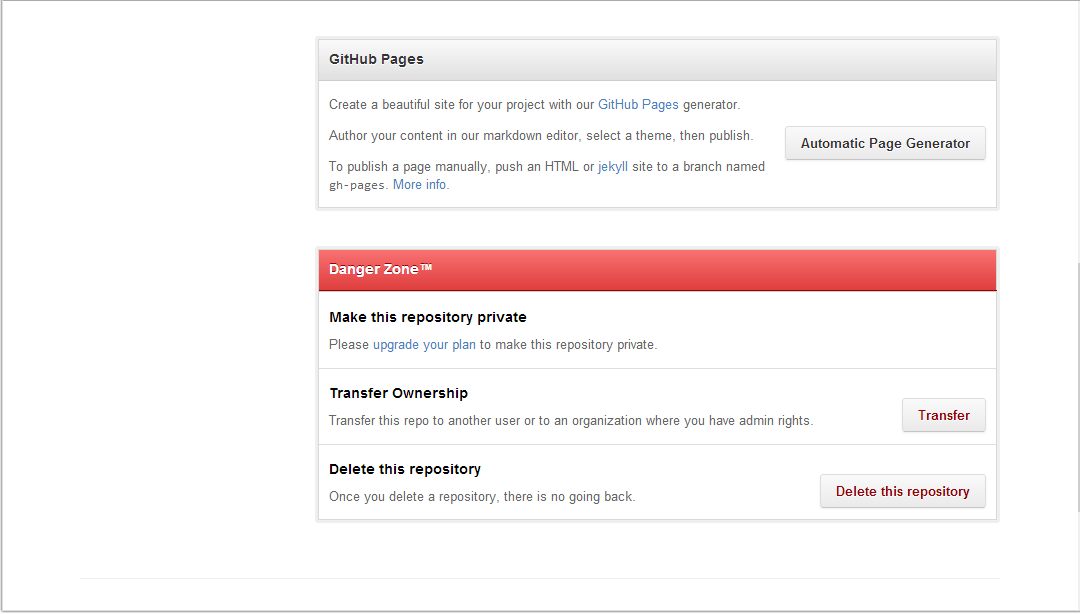
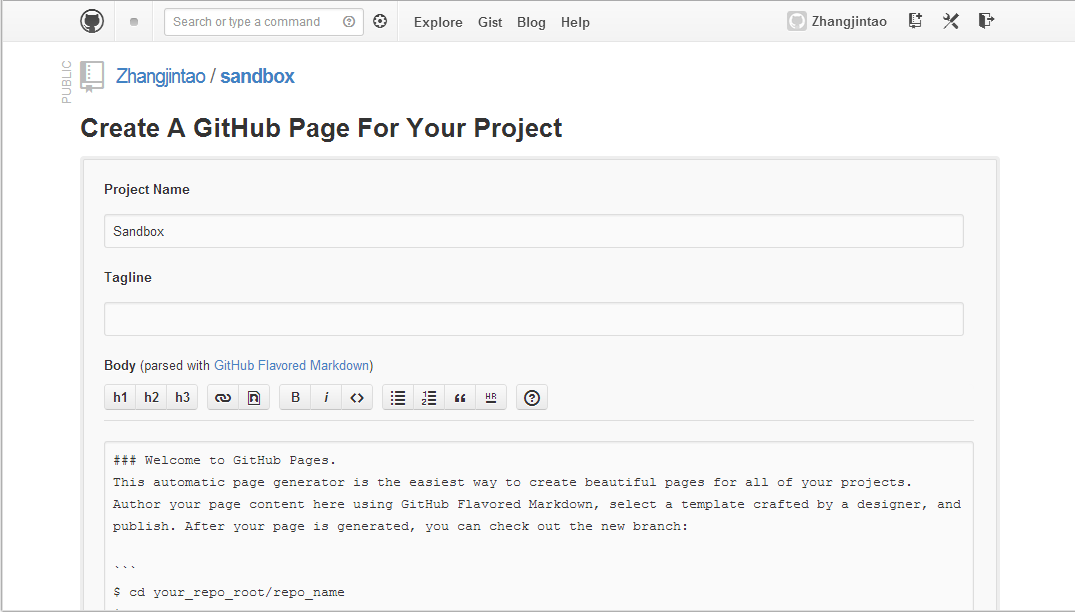
<p>在浏览器中打开你的项目，点击”sittings“（不小心注销的话就再登录一次）</p>
<p>找到Github Pages 点击那个按钮</p>
<p><a href="http://zhangjintao.noads.biz/wp-content/uploads/2013/02/Capture2.png"><img class="alignnone size-full wp-image-31" alt="Capture" src="http://zhangjintao.noads.biz/wp-content/uploads/2013/02/Capture2.png" width="1080" height="614" /></a></p>
<p>&nbsp;</p>
<p>为你的主页制作内容，完成后点击绿色按钮</p>
<p><a href="http://zhangjintao.noads.biz/wp-content/uploads/2013/02/Capture3.png"><img class="alignnone size-full wp-image-32" alt="Capture" src="http://zhangjintao.noads.biz/wp-content/uploads/2013/02/Capture3.png" width="1075" height="612" /></a></p>
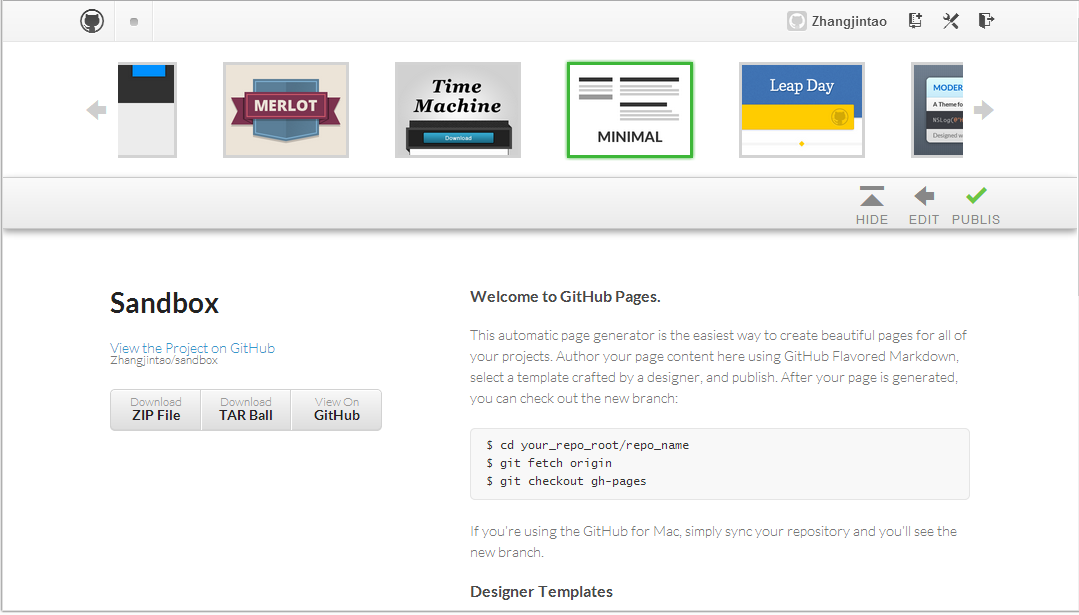
<p>选取一种模板，如果你想自定义你的页面，可以随便选择一个。。。完成后点击对勾</p>
<p><a href="http://zhangjintao.noads.biz/wp-content/uploads/2013/02/Capture4.png"><img class="alignnone size-full wp-image-33" alt="Capture" src="http://zhangjintao.noads.biz/wp-content/uploads/2013/02/Capture4.png" width="1079" height="615" /></a></p>
<p>完成后会返回你的项目主页， 主页激活需要几分钟</p>
<p>你的页面网址像这样http://username.github.com/name/</p>
<h1>安装<strong>Jekyll</strong></h1>
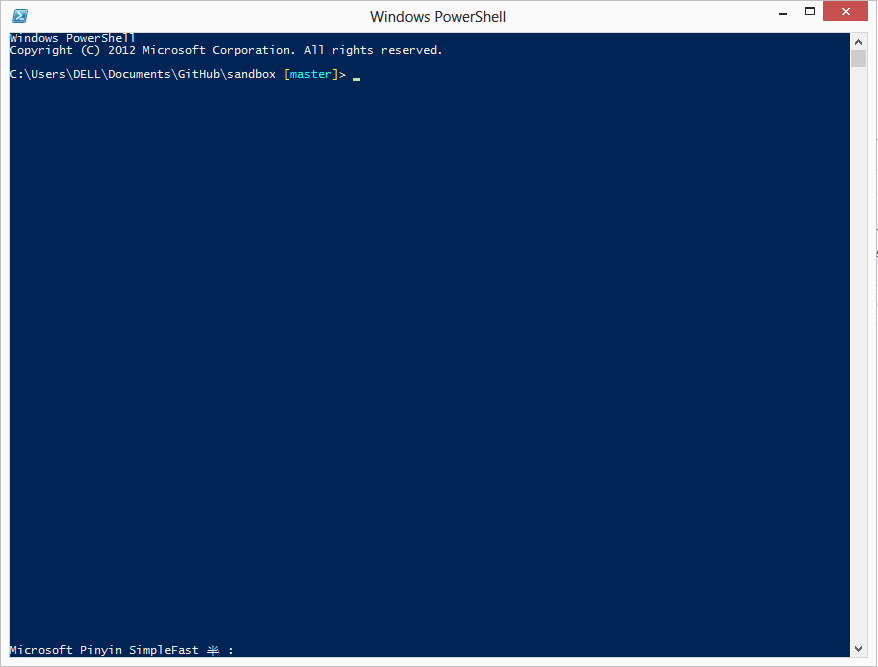
<p>右击你的项目，点击”Open a shell here“（在此处打开Shell）</p>
<p>会打开一个Powershell窗口</p>
<p><a href="http://zhangjintao.noads.biz/wp-content/uploads/2013/02/Untitled10.png"><img class="alignnone size-full wp-image-34" alt="Untitled" src="http://zhangjintao.noads.biz/wp-content/uploads/2013/02/Untitled10.png" width="878" height="667" /></a></p>
<p>&nbsp;</p>
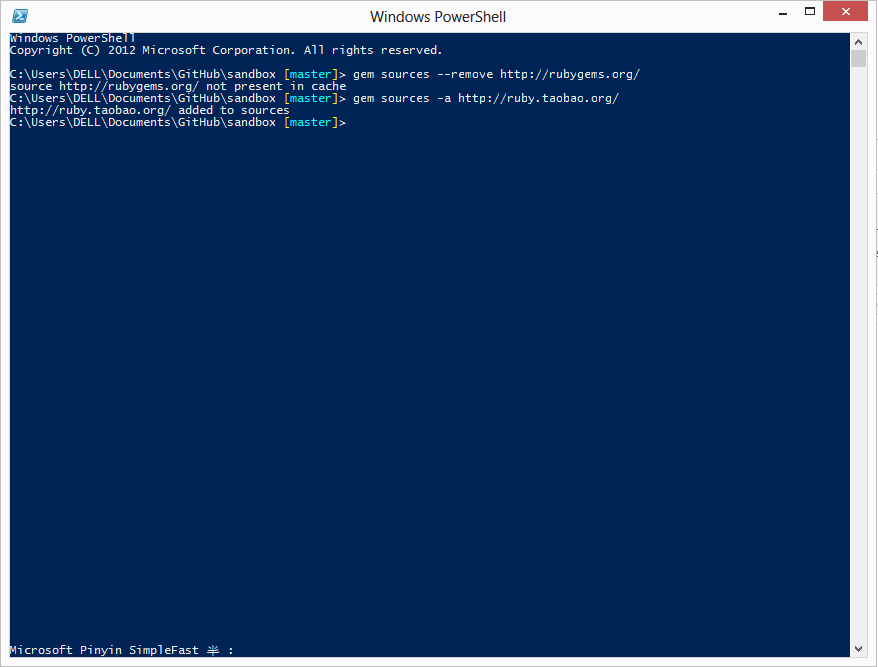
<p>执行下列代码</p>
<pre><code>gem sources --remove http://rubygems.org/
</code><code>gem sources -a http://ruby.taobao.org/</code></pre>
<p>效果是这样</p>
<p><a href="http://zhangjintao.noads.biz/wp-content/uploads/2013/02/Untitled11.png"><img class="alignnone size-full wp-image-35" alt="Untitled" src="http://zhangjintao.noads.biz/wp-content/uploads/2013/02/Untitled11.png" width="878" height="667" /></a></p>
<p>&nbsp;</p>
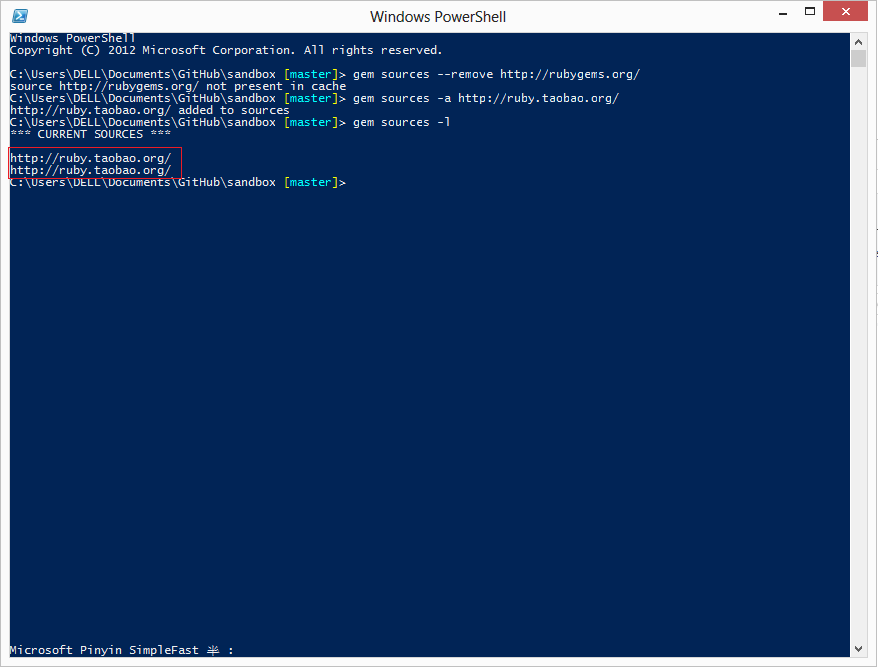
<p>执行以下代码</p>
<pre><code>gem sources -l</code></pre>
<p>正确的应该是这样<a style="font-family: Consolas, Monaco, 'Lucida Console', monospace; font-size: 0.857142857rem; line-height: 2;" href="http://zhangjintao.noads.biz/wp-content/uploads/2013/02/Untitled12.png"><img alt="Untitled" src="http://zhangjintao.noads.biz/wp-content/uploads/2013/02/Untitled12.png" width="878" height="667" /></a></p>
<p>&nbsp;</p>
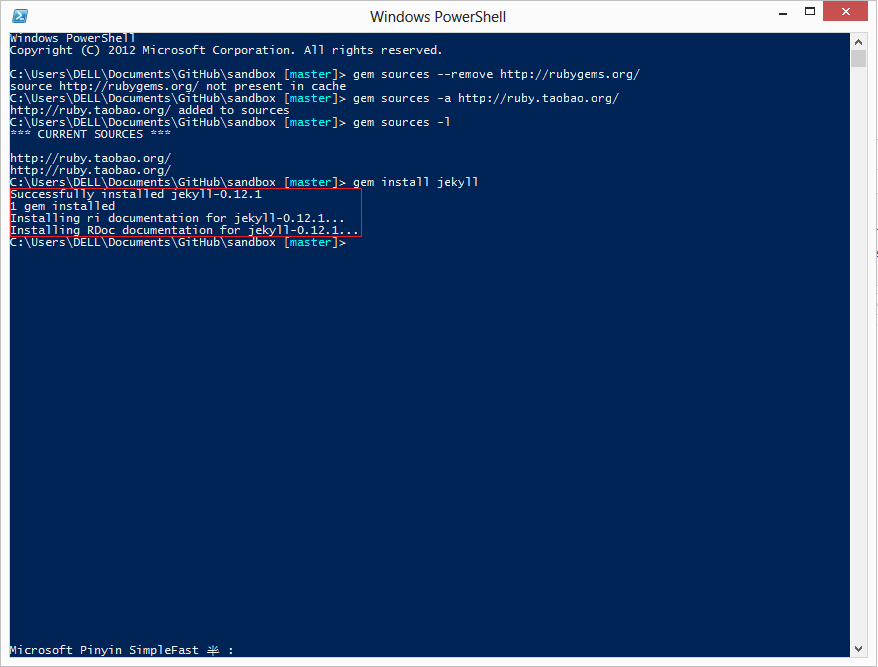
<p>执行下列代码</p>
<p><code>gem install jekyll</code></p>
<p>正确的是这样</p>
<p><a href="http://zhangjintao.noads.biz/wp-content/uploads/2013/02/Untitled13.png"><img class="alignnone size-full wp-image-38" alt="Untitled" src="http://zhangjintao.noads.biz/wp-content/uploads/2013/02/Untitled13.png" width="878" height="667" /></a></p>
<h1>自定义你的站点</h1>
<p>&nbsp;</p>
]]></content:encoded>
			<wfw:commentRss>https://zhangjintao.noads.biz/?feed=rss2&#038;p=15</wfw:commentRss>
		<slash:comments>0</slash:comments>
		</item>
	</channel>
</rss>